
Key Highlights
- Manual hazmat compliance checks take time and carry a higher risk of errors and carrier rejections.
- Missing or incorrect shipping papers are a common reason hazmat shipments get held or rejected.
- An overview of hazmat compliance and the hazmat shipping requirements teams need to meet.
Introduction
Imagine a mid-sized chemical distributor whose entire truckload of product is turned away at the dock. The reason: the hazard class on the label doesn’t match the shipment’s Safety Data Sheet. The shipment sits on hold for three days while the compliance team rushes to fix and resend the paperwork. The delay strains the customer relationship and brings costly penalties. Situations like this happen more often than most enterprises realize. Hazmat compliance is no longer a minor paperwork task. If it isn’t handled carefully, it can seriously impact the business.
The more countries you export to, the more sets of hazmat rules you have to follow. Rules differ at origin and destination, and all of them must be met. Yet many logistics teams still rely on manual document creation and spreadsheet tracking. These disconnected processes lead to mistakes and rejections. This blog breaks down the hazmat shipping documents, labels, and checks teams need to stay in control of hazmat compliance. It also explains how ERP-integrated shipping software helps meet hazmat shipping requirements.
What Is Hazmat Compliance Management?
Hazmat compliance management means following the standards and regulations for shipping hazardous materials. These are set by bodies such as the U.S. Department of Transportation (DOT) and its Pipeline and Hazardous Materials Safety Administration (PHMSA), IATA for air shipments, and the IMO for ocean shipments. It requires preparing the correct paperwork, applying the right hazard labels, and making sure packaging meets the regulations before the shipment leaves the warehouse.
What Hazmat Shipping Requirements Challenges Do Teams Face?
Even skilled logistics teams find it hard to keep up with complex hazmat rules. When rule data isn’t connected to the shipping system, confusion follows. Here are the most common problems teams run into.
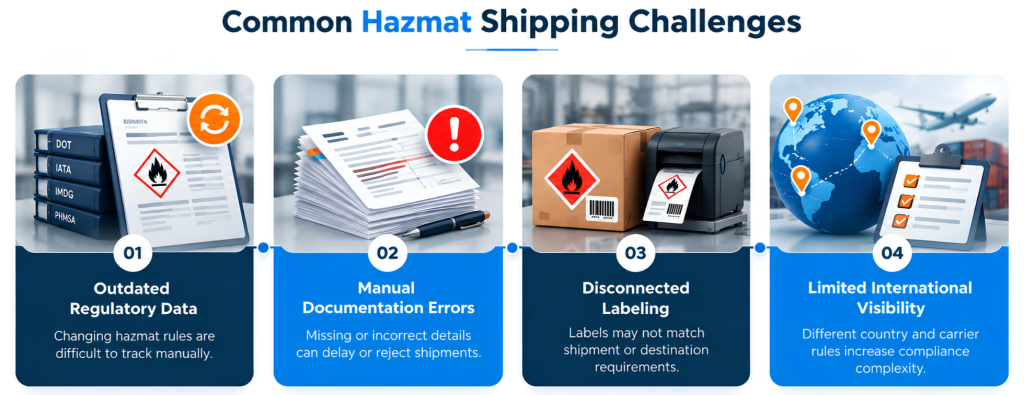
Inconsistent or Outdated Regulatory Data
Hazmat rules, such as hazard classes, packing rules, and what each carrier accepts, change over time. Teams that rely on spreadsheets or manual checks lose track of these updates. This can lead to fines or shipments being rejected by the carrier. Keeping every product’s rules up to date by hand is a huge, never-ending task.
Manual, Error-Prone Documentation
Creating hazmat shipping documents by hand often leads to typos or missing details. One wrong entry can get a shipment rejected. For companies shipping many hazmat products every day, these errors add up fast.
Mismatched Labels
Labeling usually means manually checking product details against a rulebook. Without a connected system, labels often don’t match the actual shipment. This is especially risky when shipping hazardous materials internationally, because labeling standards vary by destination.
Limited Visibility into International Requirements
Shipping hazmat goods involves different paperwork, languages, and carrier rules for each country. Without one central system for these rules, teams often find out about a problem only after customs stops the shipment. Manual, disconnected processes make it very hard to get ahead of these compliance issues.
These recurring problems show that manual tools and one-off systems can’t keep up as hazmat shipping grows. That’s why companies are moving to shipping solutions that integrate with their ERP and handle everything in one place. For companies using ERP systems, hazmat compliance then stops being a separate manual task and becomes part of the order and shipping process.
Why Choose ERP-Integrated Shipping Software Over Standalone Hazmat Tools?
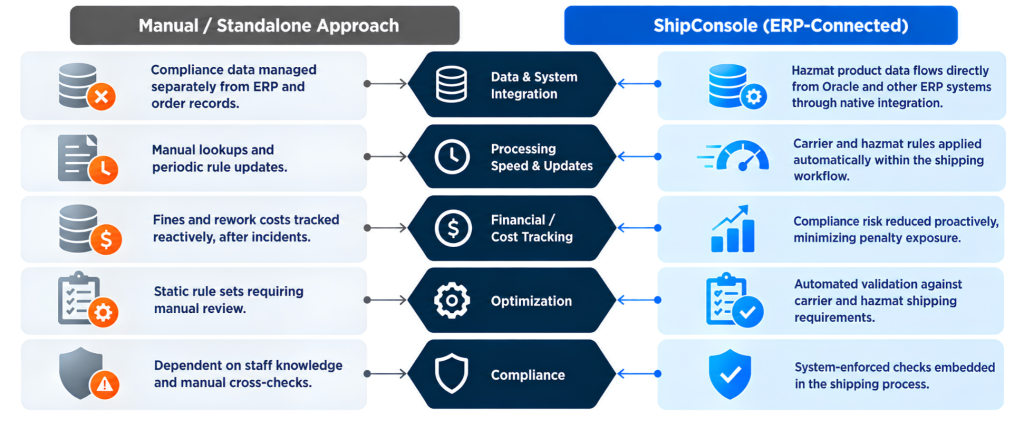
Here’s how manual hazmat compliance compares with an ERP-integrated solution like ShipConsole.
How Does ShipConsole Simplify Hazmat Compliance?
ShipConsole integrates natively with your ERP, so hazmat rules are checked during the shipping process. Every order automatically carries its hazmat data, required documents, and carrier documents. Compliance is built in as soon as you create the order.
1. Native ERP Integration
ShipConsole natively integrates with Oracle EBS, Oracle Fusion Cloud, JD Edwards, NetSuite, and Microsoft Dynamics 365. It pulls product, order, and hazmat data straight into the shipping process, so shipping users never re-enter information. There’s no double data entry, and hazmat product information stays accurate and up to date. The same integration also helps calculate rates and choose the right carrier.
2. Certified Hazmat Carrier Integrations
ShipConsole is certified for hazmat shipping with UPS, FedEx, and USPS, and also integrates with several other parcel and freight carriers. Teams can ship hazmat goods across their carrier network from one platform, without switching between carrier systems.
3. Real-Time Rates and Quotes
Shipping costs and carrier options are calculated instantly, including hazmat-related fees and carrier restrictions. This helps avoid unexpected costs later. Accurate quotes upfront also keep the actual shipping process running smoothly.
4. Compliance Checks Before Dispatch
Before any label or document is created, ShipConsole checks the shipment against carrier and hazmat rules. This catches mistakes early, before they turn into real compliance problems. Once everything is verified, the system moves on to creating the right paperwork.
5. Instant Hazmat Labels and Documents
Because hazmat data comes directly from the ERP, ShipConsole generates all required documents instantly from the verified shipment details, including:
- Carrier-compliant hazmat labels for every supported carrier
- OP-900 hazmat shipping documents
- Shipper’s Declaration for Dangerous Goods
- End-of-day hazmat reports
This cuts out manual paperwork and is especially helpful for international shipments, where labeling rules vary by destination. With documents handled automatically, teams also get better visibility through reporting.
6. Reports and Insights
System reports give a clear view of hazmat shipment volumes, issues, and audit history. This helps teams fix problems early instead of reacting after something goes wrong.
ShipConsole brings ERP data, compliance checks, documents, and reporting together in one place. It speeds up shipping by reducing errors and cuts the risk of costly compliance mistakes.
In a Nutshell
Manual hazmat compliance can lead to fines, delays, and inconsistent results across carriers and locations. Adding compliance checks to your ERP shipping process solves this. It automatically creates labels and documents and checks each shipment before it ships.
Is your team looking to lower compliance risk across every shipment? Or struggling to meet hazmat shipping requirements across the board? Check out the ShipConsole product page and book a demo tailored to your hazmat shipping requirements and ERP.
FAQs
What are hazmat rules?
In the U.S., hazmat rules refer to the federal Hazardous Materials Regulations issued by the Department of Transportation under 49 CFR. They’re designed to keep dangerous goods safe during handling, storage, and transport. International shipments must also follow IATA rules for air and the IMDG Code for ocean.
How do you ship a hazmat package?
Shipping hazmat can feel complicated, but a few clear steps help you send it safely and legally. Know exactly what you are shipping, make sure your staff are trained, choose a carrier that accepts the material, pack it in approved packaging, label the box, complete the paperwork, and keep copies of all records.

Pavan Telluru is the Product Manager at ShipConsole. He brings over 15 years of experience to his role and is dedicated to conducting product demos for prospects and partners on how organizations can efficiently manage their shipping execution process. He also leads marketing efforts at ShipConsole.